AI Already Did It › Media › Video › Editors & Converters
Desktop app that turns any video into translated subtitles: local Whisper speech recognition, OCR for Blu-ray subtitles, and the LLM of your choice. Translated subtitles for any video, with local Whis
| License | MIT |
|---|---|
| Generated by | Anthropic Claude Fable 5.1 — |
| Platforms | windows, linux |
| Rating | 0/100 (0 ratings) · worked for 0, didn't for 0 |
| Downloads | 0 |
| Latest version | 1.0.0 (2026-09-20) |
| Uploader | Administrator |
| Estimated generation cost | 840,060 tokens (≈ $5.04) — saved so far: 0 tokens |
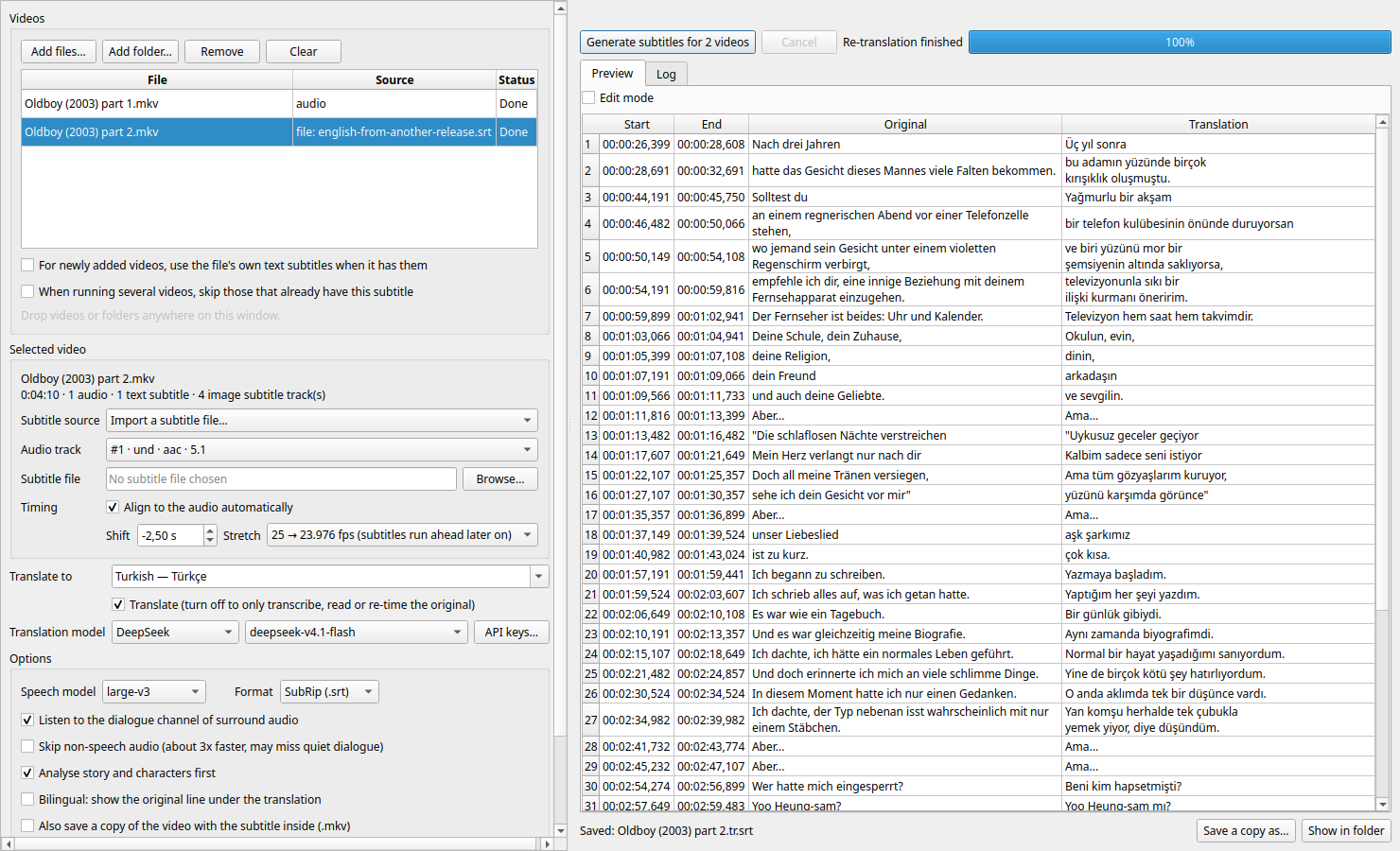
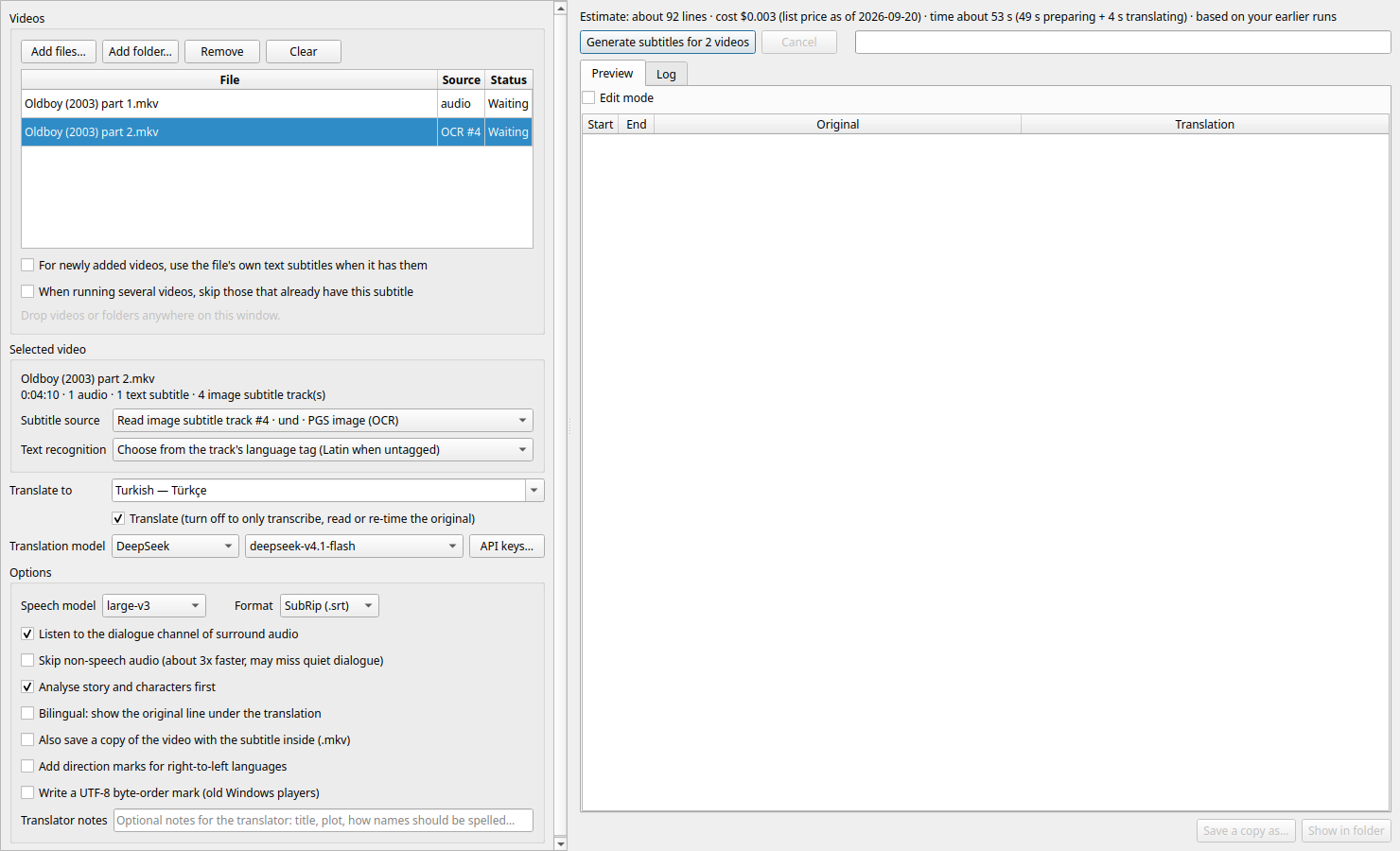
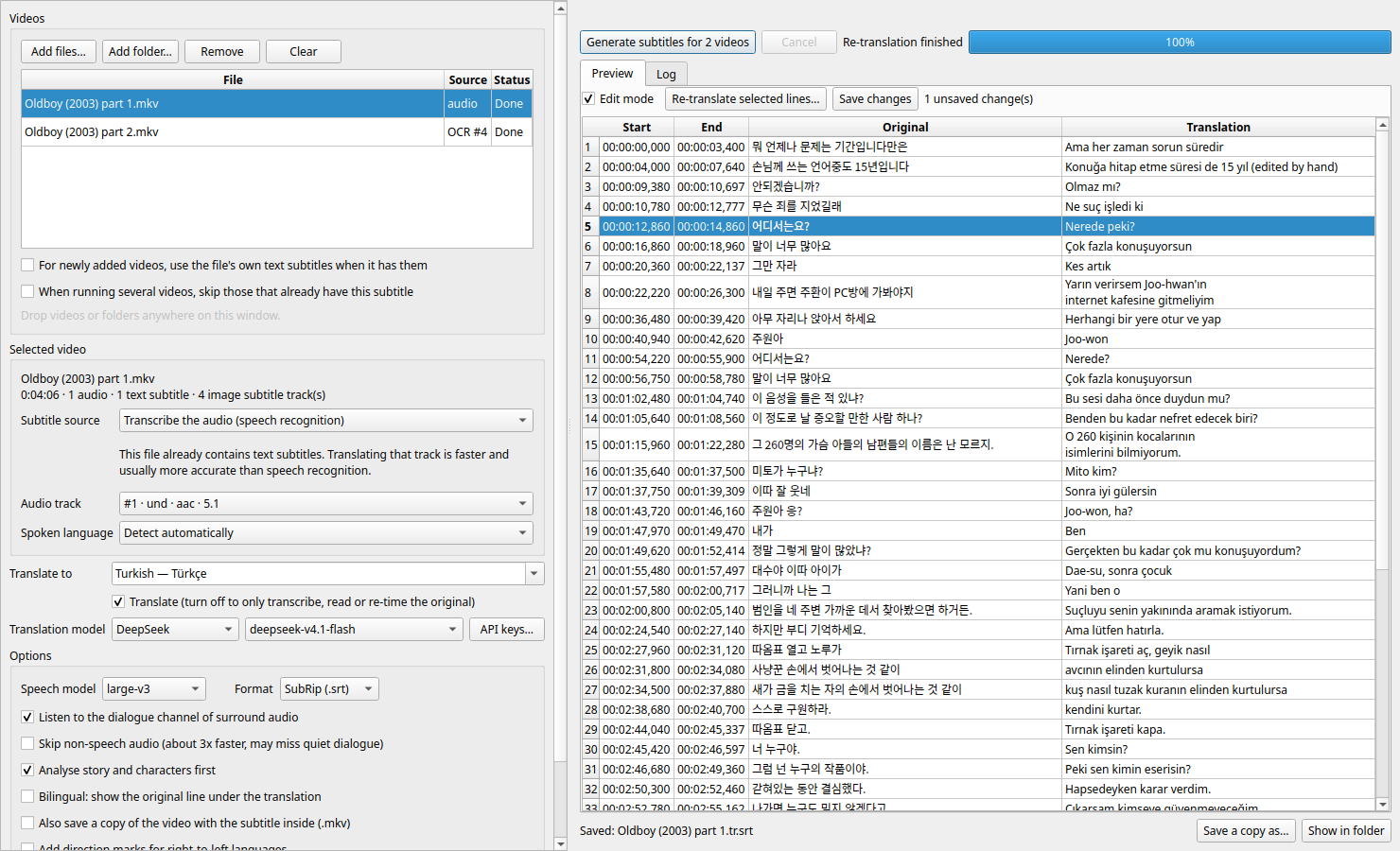
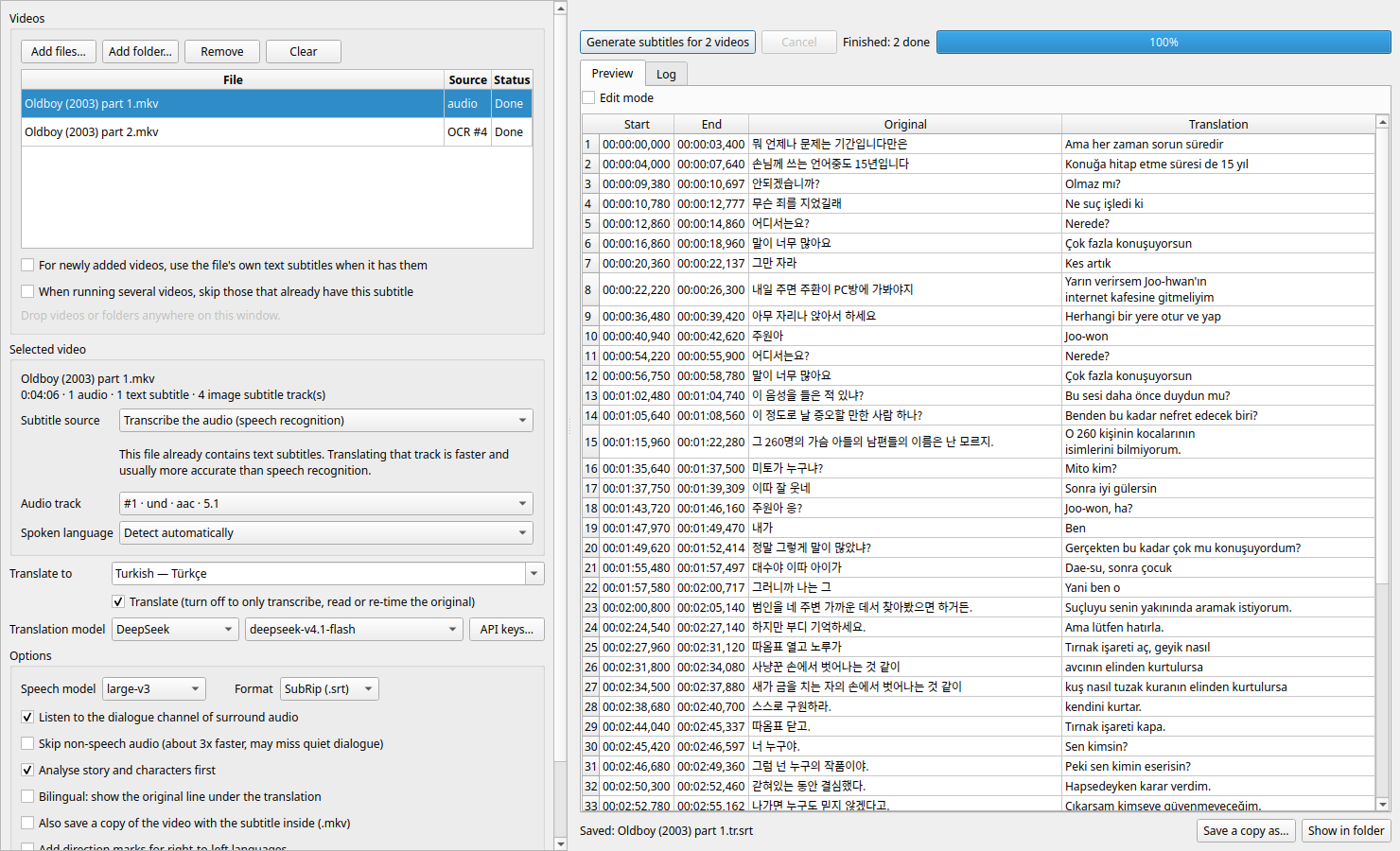
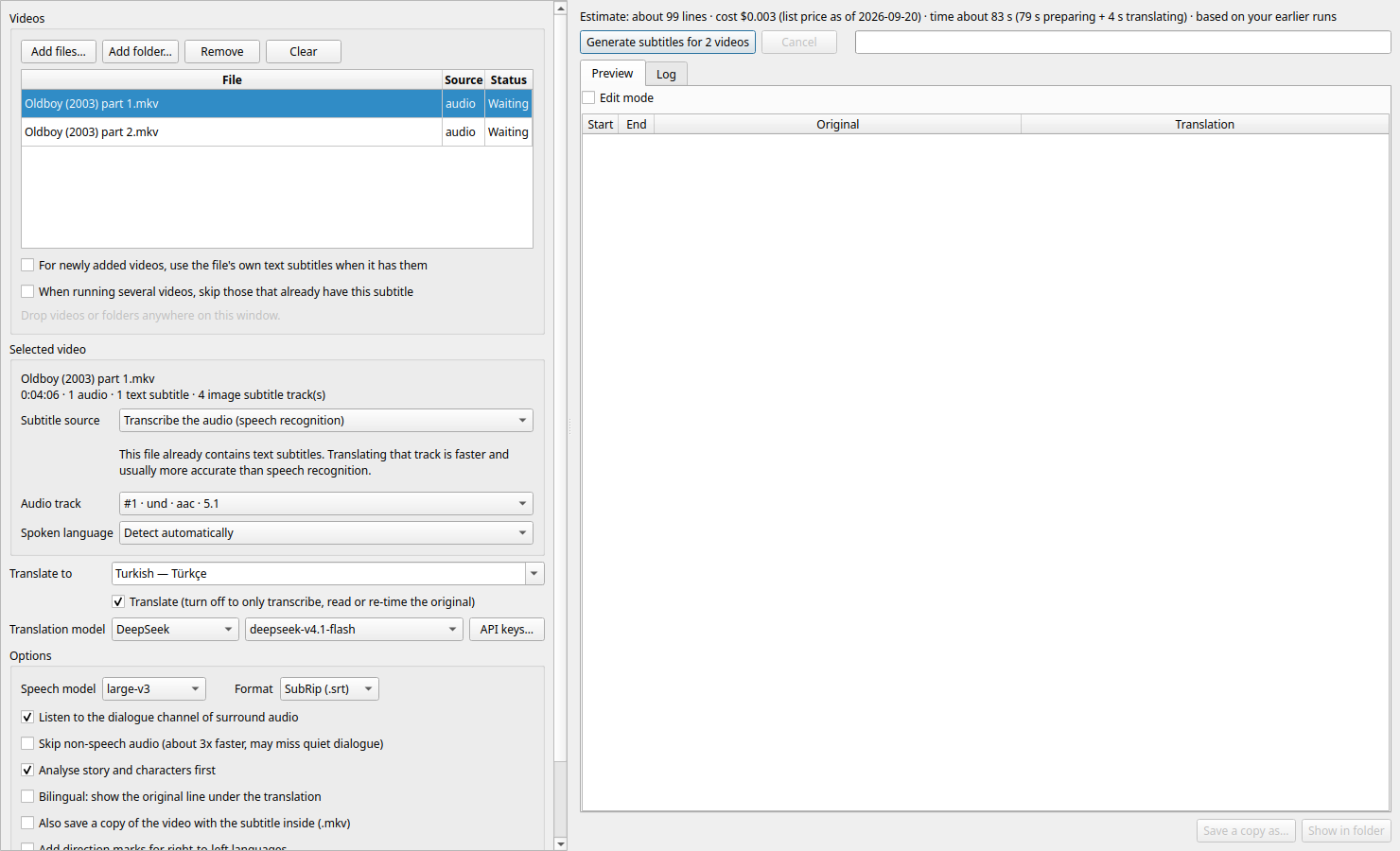
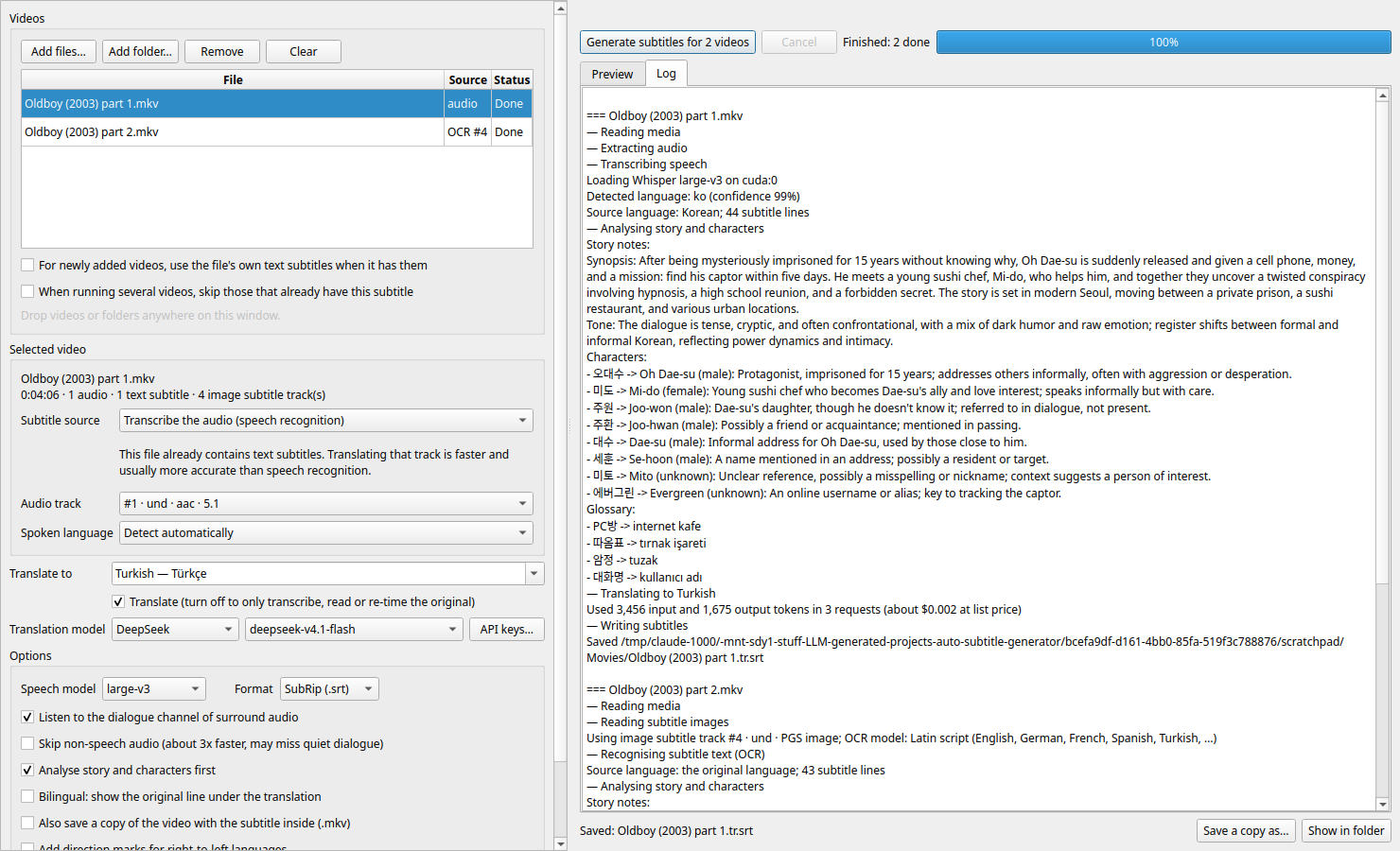
Desktop app: give it videos, pick a language, get translated .srt files.

The spoken language is detected automatically. Speech recognition runs locally on the GPU (Whisper large-v3 via faster-whisper); translation goes through LangChain to Claude, OpenAI, Gemini, DeepSeek, local Ollama or Ollama cloud.
Installers for the current version are built into dist/ (see Packaging):
| Platform | File | Install |
|---|---|---|
| Debian, Ubuntu, Mint | auto-subtitle-generator_<version>_amd64.deb |
sudo apt install ./auto-subtitle-generator_<version>_amd64.deb |
| Any x86-64 Linux | Auto_Subtitle_Generator-<version>-x86_64.AppImage |
chmod +x it and run it; nothing to install |
| Windows 10/11 (x64) | Auto_Subtitle_Generator-<version>-x64.msi |
double-click, or msiexec /i <file> |
Each one carries its own Python and every dependency. The AppImage and the Windows installer
also carry ffmpeg; the .deb uses the distribution's. After installing, open API keys… next
to the model list and paste the key of the provider you want to use (local Ollama needs none).
Three things are downloaded on first use rather than shipped, because of their size: the Whisper speech model (about 3 GB), the PaddleOCR models, and, on a computer with an NVIDIA GPU, the CUDA libraries (about 1.3 GB, checksum-verified, into your user data folder). Without an NVIDIA GPU speech recognition runs on the CPU, which is much slower; pick a smaller speech model there.
uv sync
uv run autosub                          # desktop app
uv run autosub movie.mkv ~/Videos/show  # desktop app with files and folders queued

uv run autosub-cli movie.mkv --to tr                        # headless; DeepSeek V4.1 Flash by default
uv run autosub-cli ~/Videos/show --to de --estimate         # cost and time for a whole folder, then exit
uv run autosub-cli ~/Videos/show --to de --provider claude --model claude-sonnet-4-6 --mux
uv run autosub-cli movie.mkv --to tr --subtitle-track 1     # translate an embedded track (image tracks are OCR'd)
uv run autosub-cli movie.mkv --to tr --subtitle-file other.srt --sync-auto
uv run autosub-cli movie.mkv --to en --no-translate         # transcript only
Running from source requires ffmpeg/ffprobe on PATH and, for GPU speech recognition, an
NVIDIA driver. The CUDA libraries come from pip wheels; no system CUDA install is needed.
The subtitle is written next to the video as Movie.<lang>.srt, the name media players and
Plex/Jellyfin/Kodi pick up automatically. Save a copy as… exports it anywhere else.
.srt, .vtt, .ass, …) with timing tools: shift, frame-rate
stretch, and automatic alignment to the audio (finds both; 0.16 s residual in testing).estimate.py), DeepSeek's peak-hour doubling is applied, and local Ollama shows time only.
Speed and tokens per line are learned from your own earlier runs of each model. The log shows
the tokens actually used afterwards.Movie.<lang>.mkv, a copy of the video with the subtitle added
as the default track. Nothing is re-encoded and the original is never touched. A queue of videos with the cost and time estimate A queue of videos with the cost and time estimate |
 Edit mode: hand edits and per-line re-translation Edit mode: hand edits and per-line re-translation |
 Reading Blu-ray image subtitles with OCR Reading Blu-ray image subtitles with OCR |
 Importing a subtitle file and re-timing it Importing a subtitle file and re-timing it |
 The log: story notes and the tokens actually used The log: story notes and the tokens actually used |
 API keys, stored only on your computer API keys, stored only on your computer |
API keys are entered under API keys… in the app, which stores them in a per-user file
(~/.config/auto-subtitle-generator/.env, or %APPDATA%\auto-subtitle-generator\.env on
Windows) readable only by you. A source checkout can use a .env in the project folder instead
(git-ignored; see .env.example):
ANTHROPIC_API_KEY=   OPENAI_API_KEY=   GEMINI_API_KEY=   DEEPSEEK_API_KEY=
OLLAMA_BASE_URL=http://localhost:11434
OLLAMA_API_KEY=      # optional, see below
Ollama cloud works either through the local daemon after ollama signin (no key needed), or
directly against ollama.com when OLLAMA_API_KEY is set.
The model list is looked up in this order: the file named by AUTOSUB_LLM_LIST, llm_list.json
in the per-user settings folder, /mnt/sdy1/llm_list.json, and the copy shipped inside the app.
At startup each provider is asked which
models it actually serves; entries it does not offer are shown greyed out, and for local Ollama
only installed chat models are listed. deepseek-v4.1-flash is sent to DeepSeek under its API name,
deepseek-flash. deepseek-v4-flash is sent as chosen, but DeepSeek currently answers it with the
V4.1 backend too; a separate V4 Flash is only hosted on Ollama cloud (deepseek-v4-flash:cloud).
Transcripts, OCR results and translation progress are cached in
~/.cache/auto-subtitle-generator, so a cancelled or crashed job resumes where it stopped, and a
second language for the same video skips speech recognition.
uv run pytest
packaging/build-appimage.sh    # dist/Auto_Subtitle_Generator-<version>-x86_64.AppImage
packaging/build-deb.sh         # dist/auto-subtitle-generator_<version>_amd64.deb
packaging/build-msi.sh         # dist/Auto_Subtitle_Generator-<version>-x64.msi, cross-built on Linux
All three run on Linux and need uv; the AppImage also needs mksquashfs, the .msi needs
wixl or Docker. Each stages a relocatable CPython, installs the versions pinned in uv.lock
from wheels (nothing is compiled), trims Qt to the modules the app uses, and smoke-tests the
result before packing it. The NVIDIA wheels are left out on purpose: unpacked they are 2.2 GB of
the 3.1 GB total, and a single .msi cabinet cannot hold them.
packaging/make_icon.py redraws the icon (src/auto_subtitle_generator/resources/icon-*.png).
MIT, see LICENSE. Bundled third-party components keep their own licences; the
installers include them, summarised in packaging/debian/copyright. Qt (LGPL-3.0) and ffmpeg
(LGPL-2.1+, a build without GPL components) are shipped as separate, replaceable libraries.
You will now develop an application called Auto Subtitle Generator.

As the name suggests, we will provide a video file, and the application will generate a subtitle file in a selected language.

- The video's language will be detected automatically.

- The target language will be selected via a combobox. List all languages supported by LLMs here.

- You can follow this approach if you wish: take the video file, extract the audio track, translate it, and output it in subtitle format (.srt). If there is a better approach, apply that instead.

- For the LLM the application will use: you will support Claude, OpenAI, DeepSeek, cloud Ollama, and local Ollama via LangChain. The supported LLM list is in: `lm_list.json`

- The app will take the video filename and serve the generated `.srt` as a downloadable file.

- Research deeply before implementing any code

- Inform me if I missed any feature, we may implement it too. (It can be more than one)

- Here is the test video: "video.mkv"

- It should be desktop application of course

- Do your best, good luck.
Tags: desktop-app, ffmpeg, llm, ocr, speech-to-text, subtitles, translation, video, whisper