AI Already Did It › Media › Audio & Music
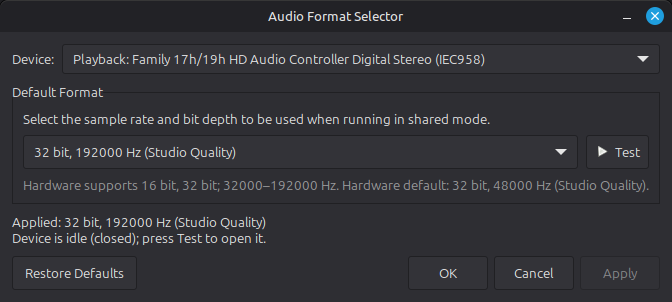
Windows-style "Default Format" dialog for PipeWire: pick the sample rate and bit depth an audio device runs at, test it, and apply it persistently on Linux Mint.
| License | MIT |
|---|---|
| Generated by | Anthropic Claude Fable 5.1 — Claude Code session; the prompt below was reconstructed from the README, not copied verbatim |
| Platforms | linux |
| Rating | 0/100 (0 ratings) · worked for 0, didn't for 0 |
| Downloads | 1 |
| Latest version | 0.1.0 (2026-09-07) |
| Uploader | Administrator |
| Estimated generation cost | 29,736 tokens (≈ $0.45) — saved so far: 29,736 tokens |
A Linux Mint / PipeWire equivalent of the Windows Speakers Properties → Advanced → Default Format dialog.
Pick the sample rate and bit depth an audio device runs at in shared mode (the format every application is mixed and resampled to), press Test to hear it, press Apply. The choice is persistent: it survives reboots and re-plugging a USB device. No root is needed; everything is written under ~/.config.
How it works. On PipeWire the Windows setting maps to three properties on the device node (audio.format, audio.rate, node.force-rate), applied through a WirePlumber ALSA rule. On Apply the program saves the choice to ~/.config/audio-format-selector/settings.json, writes a WirePlumber rule for 0.4 (Lua) and 0.5+ (SPA-JSON), and restarts WirePlumber so the device is reopened with the new format. The dropdown is filled from the device's real capabilities (PipeWire EnumFormat, refined with the exact rate list from /proc/asound for USB devices) and the status line shows what the kernel driver has actually opened. Quality labels (CD Quality, DVD Quality, Studio Quality) follow the Windows naming.
Also a CLI: --list shows devices, capabilities and current state; --set <device> --bits 24 --rate 96000 and --reset <device> work without the GUI.
Requirements: PipeWire with WirePlumber (Linux Mint 22+, Ubuntu 22.10+, Fedora, Arch), Python 3 with PyGObject / GTK 3, pipewire-bin. Tested on Linux Mint 22.3 with PipeWire 1.0.5 / WirePlumber 0.4.17. Only ALSA devices are listed; Bluetooth devices negotiate their own codec format.
Initial release: GTK 3 dialog (device picker, format dropdown built from real device capabilities, Test, Apply, Restore Defaults), persistent WirePlumber 0.4/0.5 rules, CLI (--list / --set / --reset / --apply), install.sh, .desktop entry and .deb packaging.
Reconstructed from the README (the original session prompt was not preserved):

On Windows, Speakers Properties → Advanced → "Default Format" lets me choose the sample rate and bit depth the device runs at in shared mode (e.g. "24 bit, 96000 Hz (Studio Quality)"). Build the Linux Mint equivalent for PipeWire as a small GTK 3 / Python app:

- A dialog that looks like the Windows one: device dropdown, "Default Format" group with a dropdown of "N bit, R Hz (Quality label)" entries built from the device's real capabilities (PipeWire EnumFormat, plus /proc/asound stream0 for the exact USB rate list), a Test button that plays a tone at that format, Restore Defaults / OK / Cancel / Apply, and a status line showing what the kernel driver has actually opened (hw_params).
- Apply must be persistent across reboots and re-plugging: write a WirePlumber ALSA rule (audio.format, audio.rate, node.force-rate) for both WirePlumber 0.4 (Lua) and 0.5+ (SPA-JSON), matched by node.name, save the choices under ~/.config, then restart WirePlumber. No root.
- A CLI too: --list, --set <device> --bits 16|24|32|32f --rate <hz>, --reset <device>, --apply.
- Only ALSA devices (Bluetooth negotiates its own codec). Add install.sh, a .desktop entry, and a build-deb.sh producing a .deb with the right dependencies (python3-gi, gir1.2-gtk-3.0, pipewire-bin, wireplumber).
Tags: audio, gtk3, linux-mint, pipewire, python, sample-rate